Menu
  • Helpguide
  • Release notes
  • FAQ’s
  • Helpguide
  • Release notes
  • FAQ’s
home/Knowledge Base /Reports/Centre/Enrolment by Enrolment Status
Popular Search:Submit RS7 Return, Adding a child record

Enrolment by Enrolment Status

163 views 0 July 22, 2021 Updated on September 19, 2025 Juniorlogs Team

Displays a summary of enrolment counts segmented by status to support enrolment tracking and centre planning.

What does this report do?

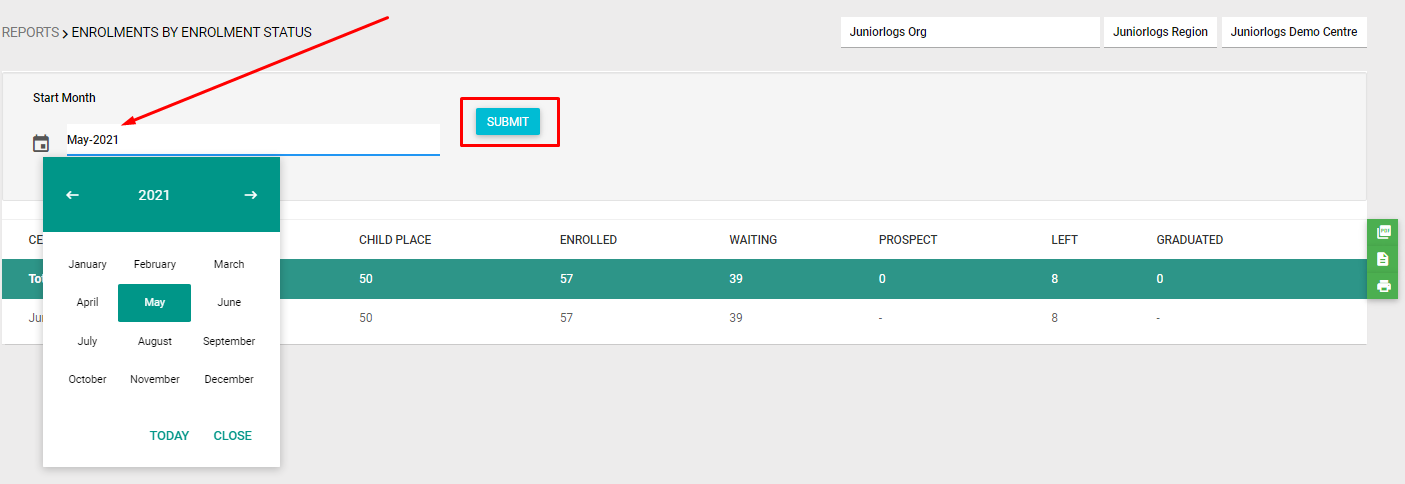
This report provides a monthly snapshot of children grouped by their enrolment status—such as Enrolled, Waiting, Prospect, Left, or Graduated. It helps centres monitor current engagement levels and follow up with families as needed.

Filters available:

  • Month (Select the desired month to view data for that period)

Report Output:

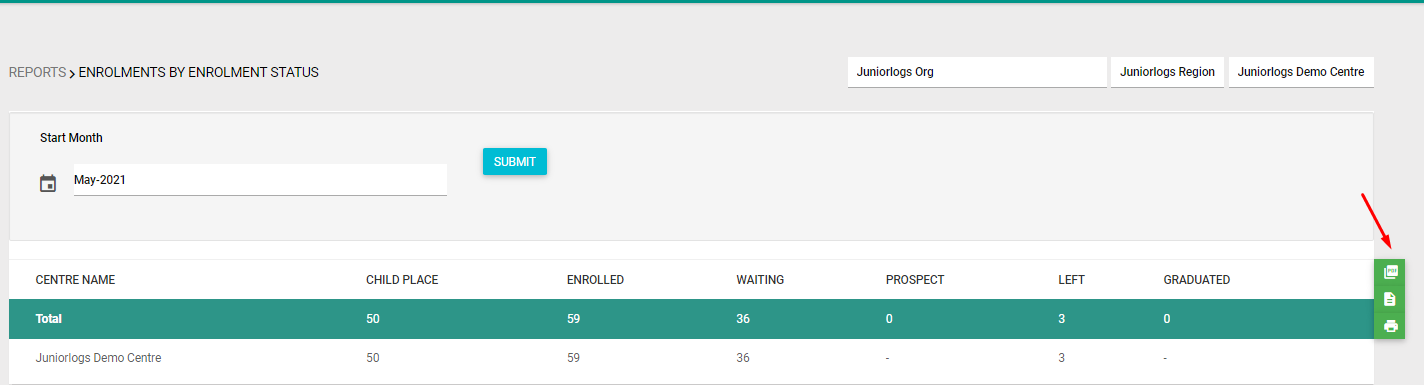
Once generated, the report displays the following columns:

  • Centre Name

  • Child Place

  • Enrolled

  • Waiting

  • Prospect

  • Left

  • Graduated

How to access the Report

  1. Click Reports
  2. Under the Centre section, select Enrolment by Enrolment Status Report. You can use the search button at the top right to search the selected report.
  3. You can also filter out by Room or enrolment start date.
  4. You can save the report as a PDF, print, or export it to excel (CSV file).

Was this helpful?

Yes  No
Related Articles
  • Multiple Enrolments Report
  • Children Report
  • Visitors Report
  • Enrolments by Gender
  • Enrolment by IWI
  • Enrolment by Language

No luck finding what you need? Contact Us

Centre
  • Enrolment by Enrolment Status
  • Multiple Enrolments Report
  • Children Report
  • Visitors Report
  • Enrolments by Gender
  • Enrolment by IWI
View All 8  
Popular Articles
  • Discretionary Hours And How They Work In Juniorlogs
  • Getting Started – Kiosk App
  • How To Clear Your Browser Cache
  • How To Mark Attendance In Juniorlogs
  • How To Install The Kiosk Application
KB Categories
  • Attendance Module
    • Absence Rules
    • Attendance And Absences
    • Closures
  • Children Module
    • Booking
    • Children Data
    • Enrolment
  • Dashboard Widgets
  • Finance & Accounts
    • Accounts and Fees
    • Aged Debtors
    • Bond Payments
    • Credit Notes
    • Fees and WINZ
    • Invoices
    • Invoices and Payments
    • Payments
    • Transaction List
  • Funding Module
  • Getting Started with Juniorlogs
    • About Children Module
    • Attendance Marking
    • Enquiry Management
    • Fee Setup & Invoicing
    • Getting Started
    • Roster & Contact Hours
  • Home-based
  • Kiosk Mobile Application
  • List View
    • New Enrolment Enquiries
  • Message Centre
  • MOE Module
  • OSCAR Centres
  • Reports
    • Booking & Attendance
    • Centre
    • Checklists
    • Children
    • EAV Audit
    • Finance
    • Kiosk Reports
    • MOE
    • OSCAR Reports
    • Staff
    • WINZ
  • RS7 Return
  • Settings Module
  • Staff Records
    • Roster and Contact Hours
    • Staff & Educators
  • Troubleshooting
  • Xero Integration

  Enrolment by IWI

Children Report  

  • Privacy Policy
  • Terms of Use
  • © 2021 Juniorlogs Team. All Rights Reserved.

Popular Search:Submit RS7 Return, Adding a child record