Menu
  • Helpguide
  • Release notes
  • FAQ’s
  • Helpguide
  • Release notes
  • FAQ’s
home/Knowledge Base /Reports/Booking & Attendance/Frequent Absence Report
Popular Search:Submit RS7 Return, Adding a child record

Frequent Absence Report

241 views 0 July 27, 2021 Updated on June 26, 2025 Juniorlogs Team

What Does This Report Do?

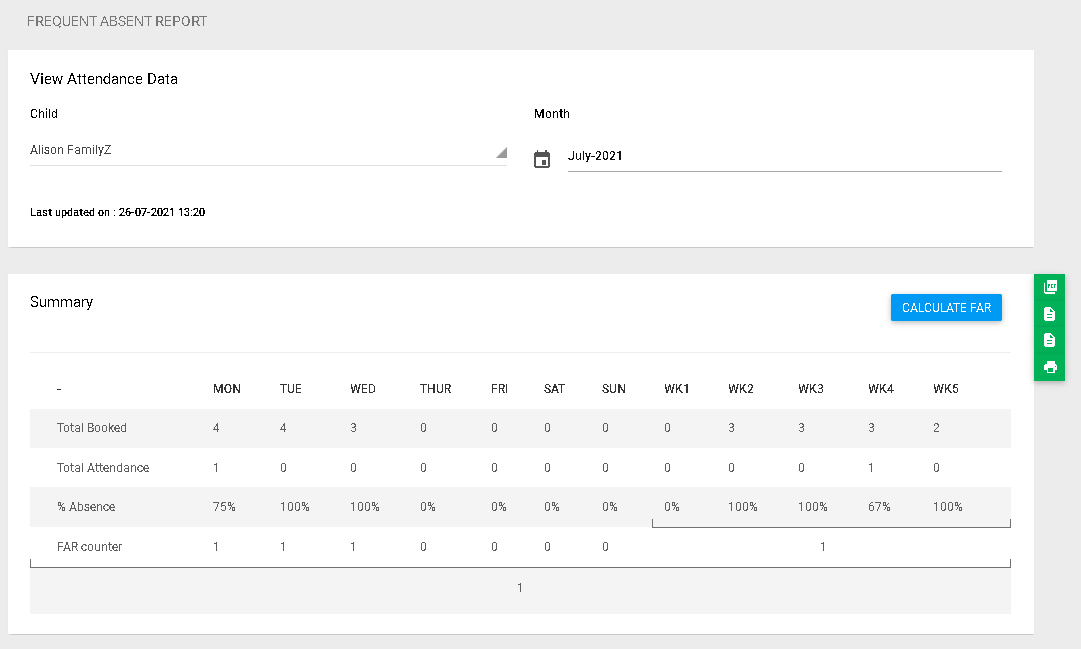
The Frequent Absence Report helps identify children who have been absent on their booked days, making it easier for services to monitor attendance consistency and determine if a child may have been caught in the Frequent Absence Rule (FAR). This assists in proactive planning and helps meet compliance requirements.

Available Filters

  • Child
  • Month

Report Output

Once generated, the report displays the selected child’s:

  • Total Booked sessions per day

  • Total Attendance

  • Percentage (%) Absence

  • FAR Counter

How to access the Report

  1. Go to the Left Menu
  2. Click Reports
  3. Under the Booking and Attendance section, select Frequent Absence Report
  4. Click Submit to generate the report
  5. You can save the report as a PDF, print, or export it to excel (CSV file).

How It Works

You can generate the report by selecting:

  • Child – Choose from the drop-down list

  • Month – Select the month you want to review

  • Click the Calculate FAR button to view the results – recommended only if multiple of attendance changes (for a couple of weeks/month) were recently actioned by centre

The system will calculate and display:

Row Description
Total Booked Number of booked sessions per day
Total Attendance Sessions the child actually attended
% Absence Absence rate calculated from booked vs attended days
FAR Counter Counts how many times the child was absent based on the Ministry’s rules

You’ll also see:

  • Weekly breakdowns (WK1, WK2, etc.)

  • The Last Updated timestamp to confirm when the data was last calculated

  • Export options: Print, PDF, or Excel for easy reporting or record-keeping

  • Monthly Breakdown tab – shows these columns: Child Name, Date, Day, Booked Hours, Attended Hours, FAR Booked Hours, FAR Attended Hours, Absence Hours, FAR Hours

Was this helpful?

Yes  No
Related Articles
  • Booking Summary Report
  • Booking/Roll Forecast Report
  • OSCAR Booking & Attendance Report
  • Monthly Attendance Report
  • Booking and Attendance Report
  • 20 Hours ECE Report

No luck finding what you need? Contact Us

Booking & Attendance
  • Frequent Absence Report
  • Booking Summary Report
  • Booking/Roll Forecast Report
  • OSCAR Booking & Attendance Report
  • Monthly Attendance Report
  • Booking and Attendance Report
View All 8  
Popular Articles
  • Discretionary Hours And How They Work In Juniorlogs
  • Getting Started – Kiosk App
  • How To Clear Your Browser Cache
  • How To Mark Attendance In Juniorlogs
  • How To Install The Kiosk Application
KB Categories
  • Attendance Module
    • Absence Rules
    • Attendance And Absences
    • Closures
  • Children Module
    • Booking
    • Children Data
    • Enrolment
  • Dashboard Widgets
  • Finance & Accounts
    • Accounts and Fees
    • Aged Debtors
    • Bond Payments
    • Credit Notes
    • Fees and WINZ
    • Invoices
    • Invoices and Payments
    • Payments
    • Transaction List
  • Funding Module
  • Getting Started with Juniorlogs
    • About Children Module
    • Attendance Marking
    • Enquiry Management
    • Fee Setup & Invoicing
    • Getting Started
    • Roster & Contact Hours
  • Home-based
  • Kiosk Mobile Application
  • List View
    • New Enrolment Enquiries
  • Message Centre
  • MOE Module
  • OSCAR Centres
  • Reports
    • Booking & Attendance
    • Centre
    • Checklists
    • Children
    • EAV Audit
    • Finance
    • Kiosk Reports
    • MOE
    • OSCAR Reports
    • Staff
    • WINZ
  • RS7 Return
  • Settings Module
  • Staff Records
    • Roster and Contact Hours
    • Staff & Educators
  • Troubleshooting
  • Xero Integration

  Monthly Attendance Report

The Frequent Absence Rule – FAR Overview report  

  • Privacy Policy
  • Terms of Use
  • © 2021 Juniorlogs Team. All Rights Reserved.

Popular Search:Submit RS7 Return, Adding a child record