Menu
  • Helpguide
  • Release notes
  • FAQ’s
  • Helpguide
  • Release notes
  • FAQ’s
home/Knowledge Base /Settings Module/MOE Settings
Popular Search:Submit RS7 Return, Adding a child record

MOE Settings

186 views 0 March 12, 2019 Updated on March 19, 2024 Juniorlogs Team

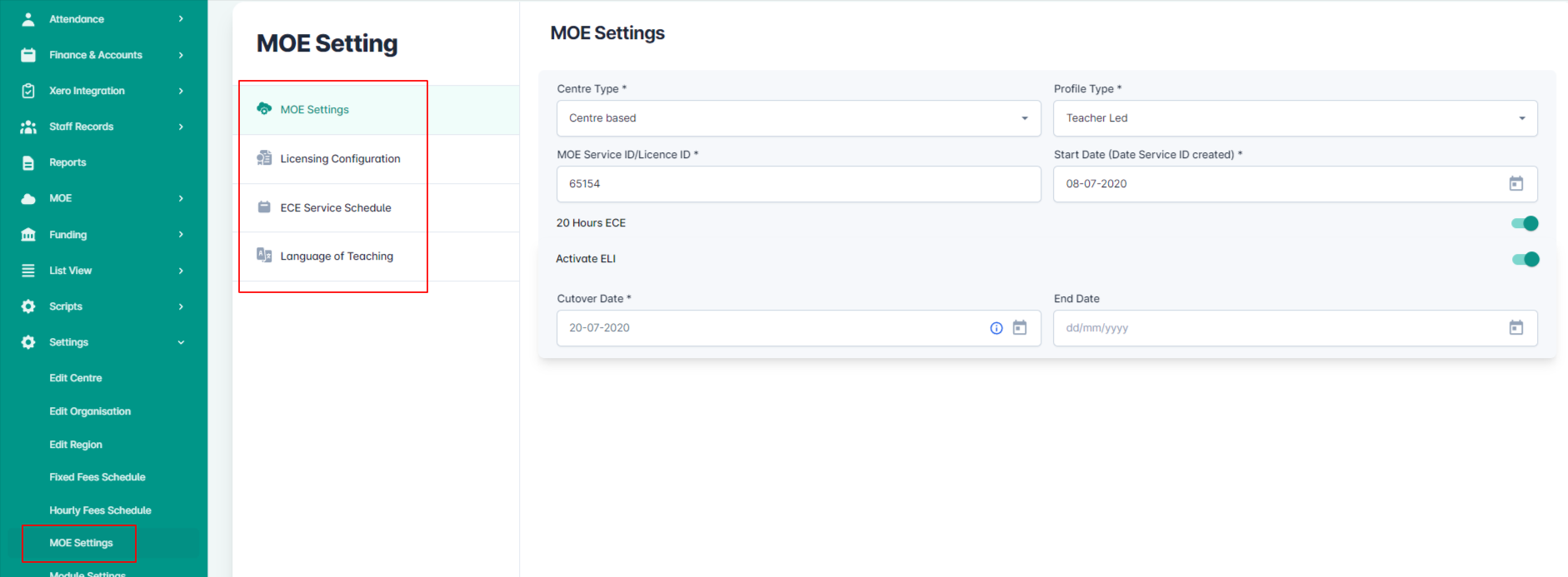
Here you can find all of your settings and details related to MOE. You can access the following information:

  1. MOE Settings – Centre type, profile type, MOE Service/License ID, Start/Cutover Date
  2. Licensing Configuration – Information about the license number, how many child places you are licensed in your centre, status and the session type of your centre (all according to your license)
  3. ECE Service Schedule – Here you can add service schedules and update them, if needed
  4. Language of Teaching – You can add the languages used in your centre, and also update whenever you want.
Was this helpful?

Yes  No
Related Articles
  • Dashboard Settings – Turn Off Birthdays on the Calendar
  • Centre Settings – Enquiry & Enrolment Settings
  • Centre Settings – Documents
  • Centre Settings – Other Notifications
  • Centre Settings – Custom Email Templates
  • Centre Settings – Kiosk Settings

No luck finding what you need? Contact Us

Settings Module
  • MOE Settings
  • Dashboard Settings – Turn Off Birthdays on the Calendar
  • Centre Settings – Enquiry & Enrolment Settings
  • Centre Settings – Documents
  • Centre Settings – Other Notifications
  • Centre Settings – Custom Email Templates
View All 11  
Popular Articles
  • Discretionary Hours And How They Work In Juniorlogs
  • Getting Started – Kiosk App
  • How To Clear Your Browser Cache
  • How To Install The Kiosk Application
  • How To Mark Attendance In Juniorlogs
KB Categories
  • Attendance Module
    • Absence Rules
    • Attendance And Absences
    • Closures
  • Children Module
    • Booking
    • Children Data
    • Enrolment
  • Dashboard Widgets
  • Finance & Accounts
    • Accounts and Fees
    • Aged Debtors
    • Bond Payments
    • Credit Notes
    • Fees and WINZ
    • Invoices
    • Invoices and Payments
    • Payments
    • Transaction List
  • Funding Module
  • Getting Started with Juniorlogs
    • About Children Module
    • Attendance Marking
    • Enquiry Management
    • Fee Setup & Invoicing
    • Getting Started
    • Roster & Contact Hours
  • Home-based
  • Kiosk Mobile Application
  • List View
    • New Enrolment Enquiries
  • Message Centre
  • MOE Module
  • OSCAR Centres
  • Reports
    • Booking & Attendance
    • Centre
    • Checklists
    • Children
    • EAV Audit
    • Finance
    • Kiosk Reports
    • MOE
    • OSCAR Reports
    • Staff
    • WINZ
  • RS7 Return
  • Settings Module
  • Staff Records
    • Roster and Contact Hours
    • Staff & Educators
  • Troubleshooting
  • Xero Integration

  How To Set Any Other Day As Start Day Of The Weekly Timesheets

How To Add A Footer Section For Weekly Attendance Sheets And Weekly Staff Timesheets (Home-based)  

  • Privacy Policy
  • Terms of Use
  • © 2021 Juniorlogs Team. All Rights Reserved.

Popular Search:Submit RS7 Return, Adding a child record