What does this report do?
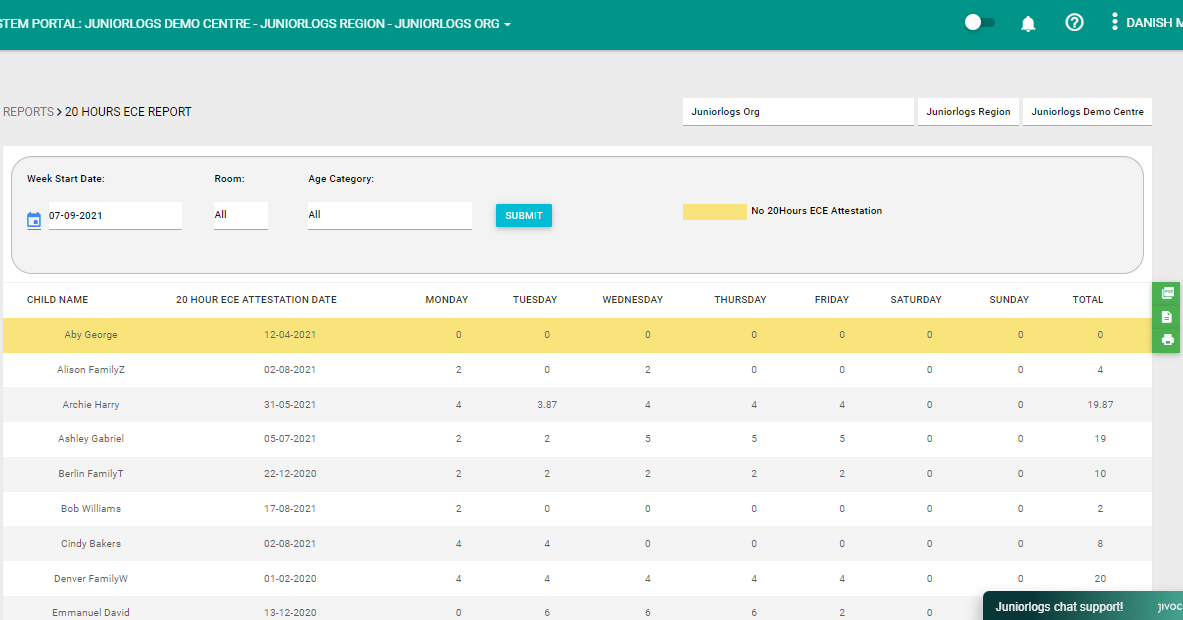
The 20 Hours ECE Report shows the allocation of 20 Hours ECE for each child across the week given the start date. It looks into the child’s 20 hours ECE Attestation start date (when they turned 3) when choosing the start date, to generate the report.
This report helps services monitor and plan 20 Hours ECE allocation more effectively by:
-
Showing all children aged 3 years and above, and their 20 hours ECE allocation throughout the week
-
Highlighting in yellow those children who do not have an 20 hours ECE Attestation added on the child’s booking.
This allows you to identify which children were missed out and need to be updated at a glance, and also to plan out/ensure that the 20 Hours ECE allocation is efficiently distributed throughout the week.
How to access the report?
- Click Reports
- Under the Booking and Attendance section, select 20 Hours ECE Report. You can use the search button at the top right to search the selected report.
- You can also filter out by Room or per age category.
- You can save the report as a PDF, print, or export it to excel (CSV file).